Before you start
5 minutesHave these four things ready. Exports are enough; nobody needs to connect anything.
Steps 1–3 · Set up the event
Once per event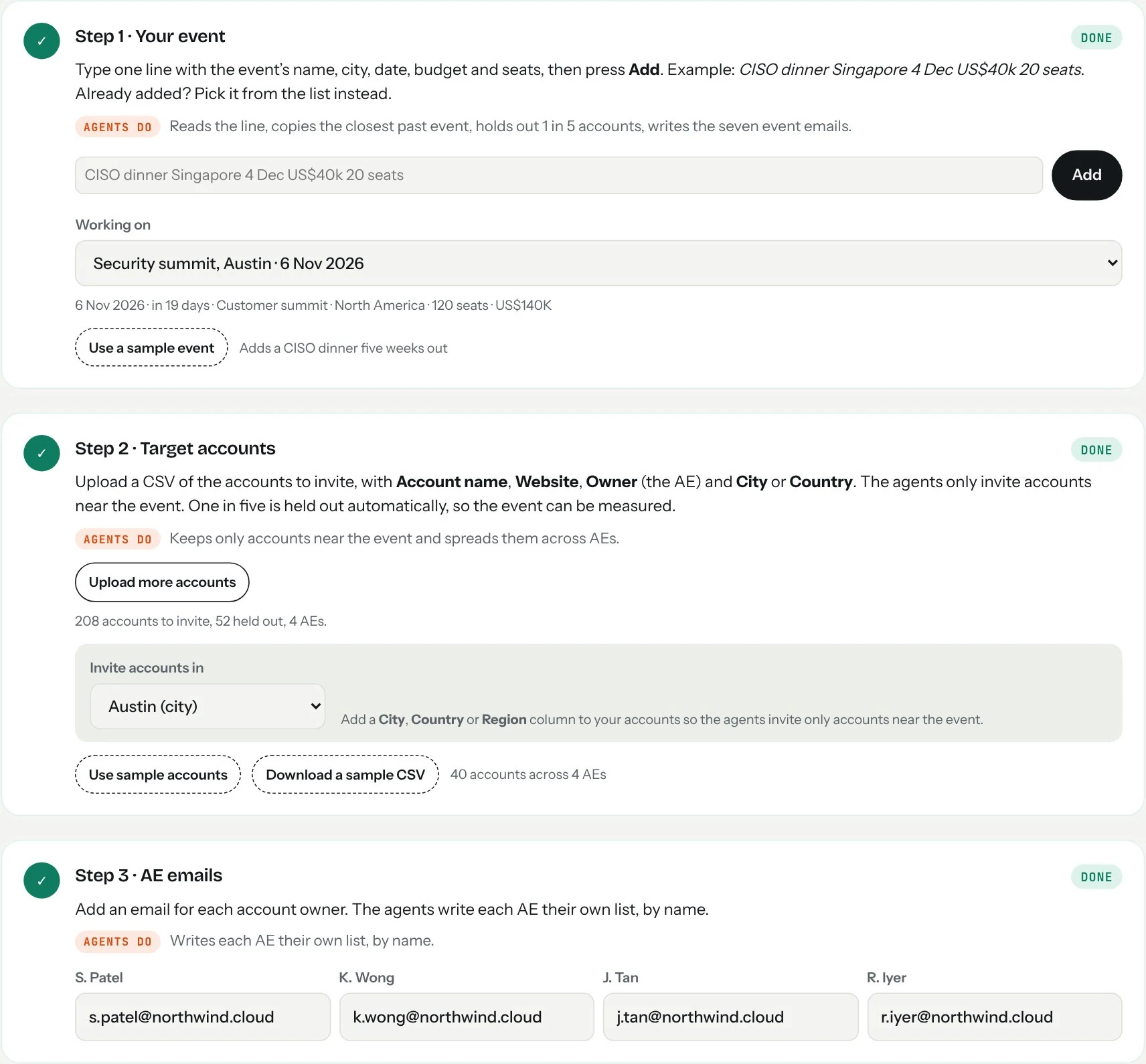
- Type the event in one line, then press Add.Name, city, date, budget and seats, for example
CISO dinner Singapore 4 Dec US$40k 20 seats. Eventworth reads each part. To work on an existing event, pick it from the list. - Upload your target accounts.Click Upload accounts (CSV). If a similar past event exists, you can reuse its accounts instead. One in five accounts is held out automatically and not invited. That comparison is how the event is measured.
- Add an email for each AE.Step 3 lists every account owner. Type each email; it saves as you leave the field.
Step 4 · More of the right people registered
Opens 60 days before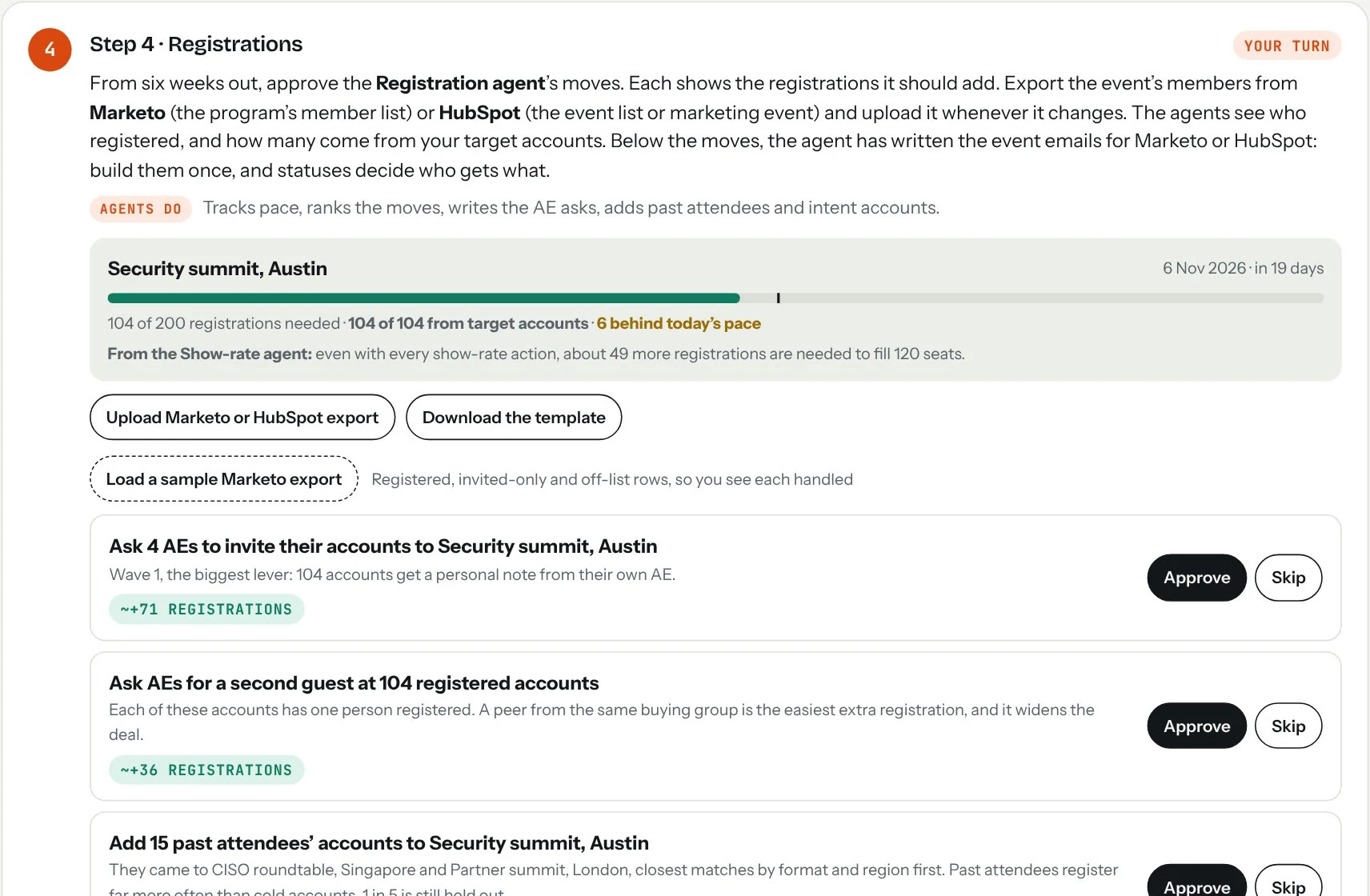
- Upload the registration export.Click Upload Marketo or HubSpot export. Do it again whenever registrations change; nothing is counted twice.
- Read the pace line.It shows registrations against what the room needs, how far behind today’s pace you are, and how many registrations come from target accounts. Aim to raise that share, not only the total.
- Approve the agent’s moves, top first.They are ranked by expected registrations: AEs inviting their own accounts, reminders to quiet AEs, past-attendee and intent accounts, invite waves. Skip any you disagree with.
Open the event program and export its members, keeping the progression Status column. Invited-only members are ignored.
Export the contacts for the event (its list or the marketing event’s participants) with email, company and the registration or attendance property.
Set up the event emails, once
Right after step 4 opensUnder step 4’s moves, the agent shows seven emails with send dates, audiences and tokens. Switch between Marketo and HubSpot at the top of the kit.
Clone your event program template. Paste each email from the kit into the program’s emails; the tokens are already in Marketo format ({{lead.First Name}}, {{my.Registration Link}}). Fill the program’s My Tokens, build the smart lists from the kit’s audience rules, and schedule the batch campaigns on the kit’s dates.
Create one marketing email per row, with the kit’s HubSpot tokens ({{ contact.firstname }}). Build an active list per audience, and a workflow that sends the calendar hold on registration and the thank-you or we-missed-you the day after.
Exclude the held-out accounts from every invite. Click Download held-out list, import it as a static list, and add it as an exclusion. If held-out accounts are invited, step 7 can’t measure the event.
The AE invites, confirmation asks and sales follow-ups are not in Marketo or HubSpot. They go from each AE’s own mailbox, through the send bar.
Grow the registration list
Weeks 6 to 2When registrations from target accounts are behind pace, the Registration agent proposes these, ranked by expected registrations. Approve the ones that fit.
- AE personal invites.Each AE invites their own target accounts. Usually the biggest lever.
- Past attendees of similar events.Added to the account list; their AEs then get an invite ask.
- A second guest per account.Where one person from an account has registered, the AE asks for a peer from the same buying group.
- Re-invite past no-shows.People who registered for an earlier event and didn’t come, at accounts on this list.
- Intent accounts, peer invites and the second invite.Upload an intent file to add surging accounts. Two weeks out, speakers and confirmed guests each bring a peer, and the second invite goes from Marketo or HubSpot.
Partner and sponsor co-invites stay manual: ask partners to invite shared accounts, and include their registrants in your export.
Step 5 · Get registrants through the door, then send
Opens 21 days before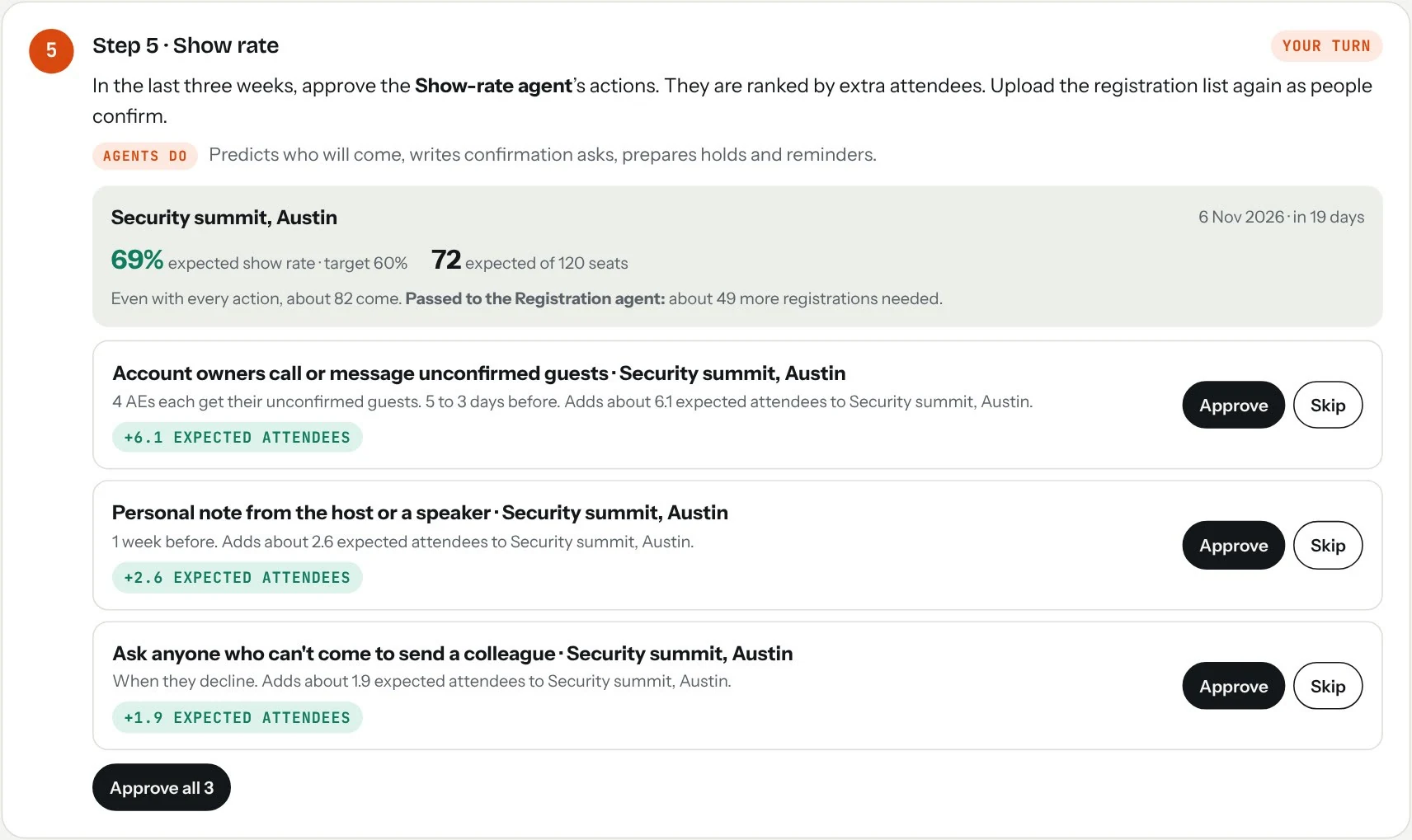
- Check the expected show rate.It comes from each guest’s status, account tier and the actions already taken. If the room still won’t fill, the agent says how many more registrations step 4 needs.
- Approve the actions ranked by extra attendees.AE confirmation calls usually add the most, then a host note, reminders and calendar holds.
- Send from the bar at the bottom.Whenever messages are ready, a bar appears at the bottom of the screen. Pick Gmail or Outlook and click Send next: each message opens addressed and written, and you press Send. Or download one mail merge file.
Guest-facing emails such as reminders still go from Marketo or HubSpot, so your templates, tracking and unsubscribes stay intact. Eventworth writes the AE asks and personal notes.
Step 6 · Turn attendees into meetings
Opens on event day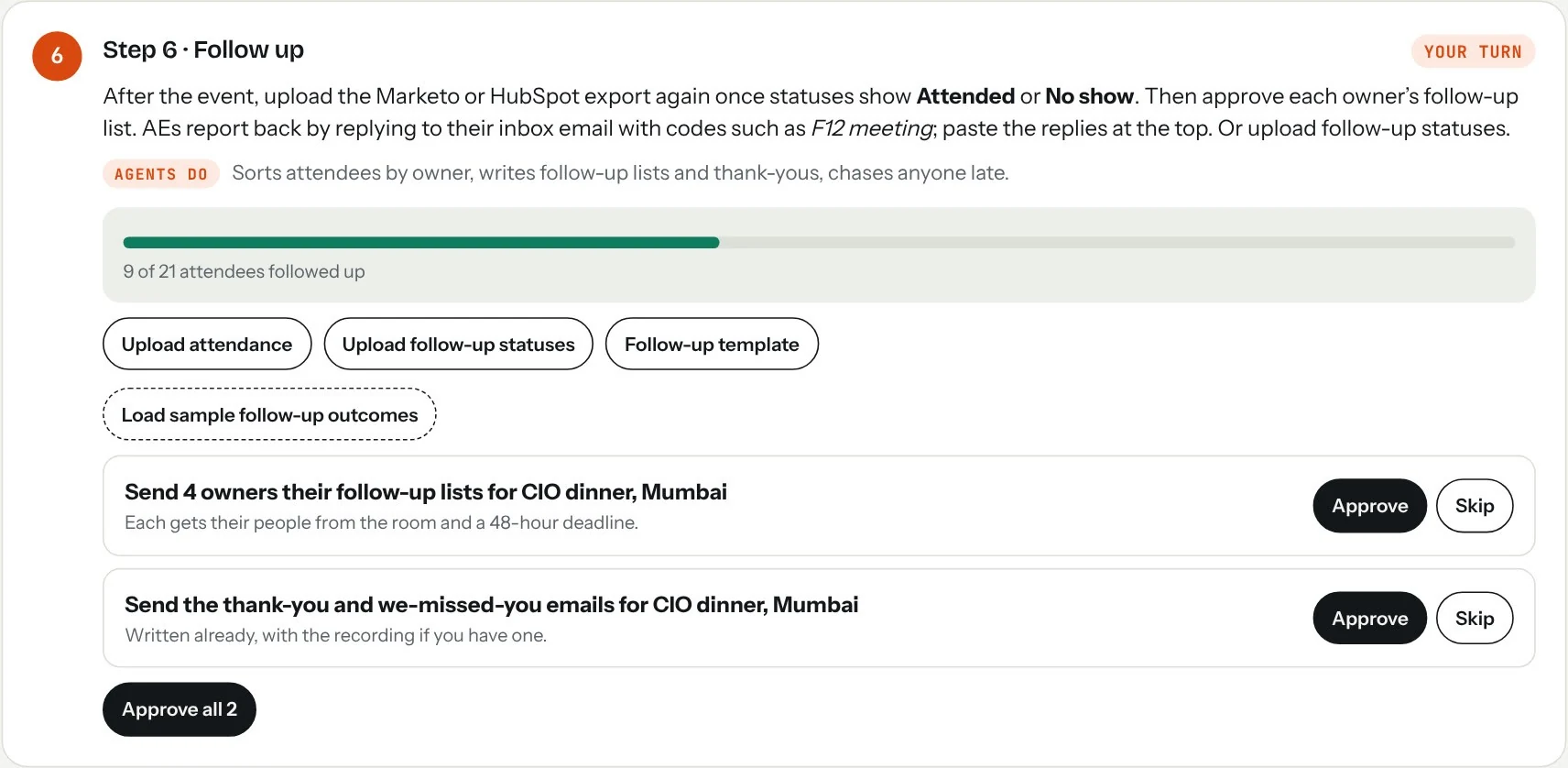
- Upload the export again after the event.Once statuses show Attended or No show in Marketo or HubSpot, upload the same export. Attendance is read from the status.
- Approve the follow-up lists.Each AE gets only their own people, with a 48-hour deadline. Thank-you and we-missed-you emails are written too.
- Upload follow-up statuses as they come in.A CSV with email and outcome (sent, replied, meeting). The agent reminds anyone past the deadline.
Step 7 · Know what to repeat, fix or stop
2 to 4 weeks after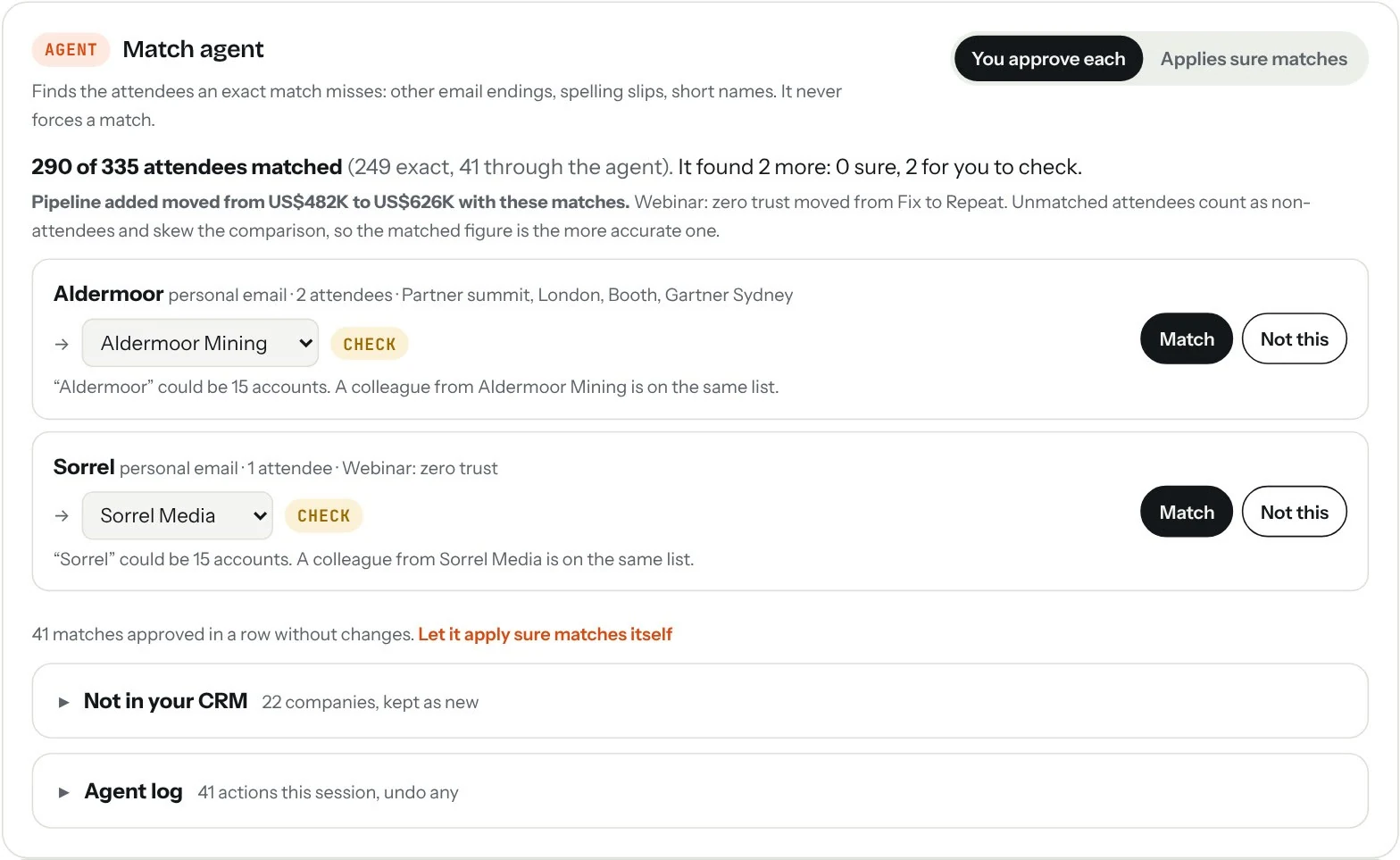
- Drop a CRM export and the attendee lists.One attendee list per event, or one file with an Event column. Enter each event’s spend and date.
- Approve the Match agent’s matches.It finds attendees an exact match missed. Sure matches can be approved in one click; the result updates as you go.
- Ask the analyst.Which events to stop, which format works best, why one event underperformed. Every answer shows the events behind it.
File formats
Column names don’t need to match exactly. These are the ones Eventworth looks for.
| File | Columns it reads | Marketo name | HubSpot name |
|---|---|---|---|
| Accounts | Account name, Website, Owner | Company Name, Website, Account Owner | Company name, Company domain name, Company owner |
| Registrations | Email, Company, Job title, Status | Email Address, Company Name, Job Title, Status | Email, Company name, Job title, your event status property |
| Follow-up | Email, Outcome or Replied or Meeting | Any CSV with these columns, or the template in step 6 | |
| CRM export | Account name, Website, Amount, Created date | An opportunities report from Salesforce or HubSpot deals | |
Statuses: Registered and Confirmed count as registered, Attended and Checked in as attended, No show as not attended. Invited, Sent and similar email statuses are skipped.
Questions
Does Eventworth connect to Marketo or HubSpot directly?
Today it works from exports you upload, so there is no setup or security review. Direct sync, which pulls statuses on a schedule and writes attended and follow-up statuses back, is in early access.
Is our data uploaded anywhere?
Files are read in your browser and saved in that browser only. Nothing is sent to a server. Clearing the browser’s site data clears the workspace.
Will an agent ever send an email by itself?
No. Messages wait in the send bar until someone opens and sends them. Agents can add accounts or prepare reminders on their own only after you allow it.
Why are some accounts held out?
One in five target accounts is not invited. Comparing their pipeline with the accounts that attended shows what the event added, which is what the verdict in step 7 is based on.
Do the agents run when the workspace is closed?
Not yet. They check everything each time the workspace is opened, so open it a few times a week while an event is live.